Using Squabbit
Finding and joining the 2026 Ohio Cup Tournament
There are two ways to join a group on Squabbit:
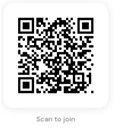
1. Using the app link or QR Code The easiest way to join the tournament is by tapping the following link:
https://app.squabbitgolf.com/tournament?inviteCode=YAZHFU
or Scanning the QR code to join
Tapping the link or scanning the QR Code will open the app and take you directly to the 2026 Ohio Cup tournament where you can register.
If you don’t have the app installed yet, you’ll be prompted to download it first and then be taken to the group automatically.
Registering for the group
Once you’ve found our group using any of the methods above, you’ll be taken to the 2026 Ohio Cup home screen. If the admin has already added you to the group, you’re all set — no action needed. Otherwise, the admin will need to register you. Please contact Willie Kennedy, 216-533-6963 (kennewi@att.net), with your First Name, Last Name and email address and he will get you registered.
Forgot your Password?
On the sign-in screen, tap Log in, enter your email address, then tap “Forgot password”. Squabbit will send reset instructions to that email; If you don’t see it, check your spam folder.
Playing in a tournament
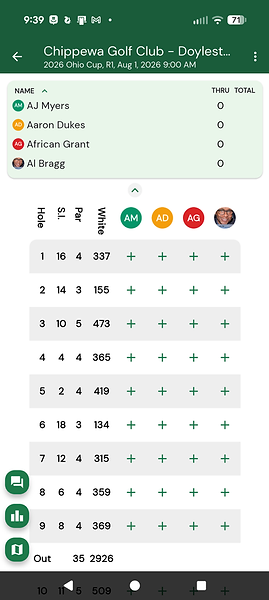
On the day of the tournament, open the tournament and navigate to the Leaderboard or Schedule tab. You will see a Begin scoring button which will open your scorecard.
From the scorecard, tap the green + buttons to enter your hole score. After entering a score for one player, you’ll automatically be prompted to enter the score for the next player in your group.
The Leaderboard
Once play has begun, you can check your position on the leaderboard anytime by clicking on “Leaderboard” to see the leaders from each flight. Selecting “Overall” will show the players position, “Round 1” will show the players position and score from each hole.